rowcraftDownload app

A little closer
to your data.

Built with Rust.

Open source. Yours to explore.

Less between you and your database.
A thoughtfully built, open source workbench.
Crafted for focus. Built for your workflow.

Connections 3
PostgreSQL postgres
MongoDB mongo
SQLite sqlite
A desktop home for your databases.
macOS · Windows · Linux
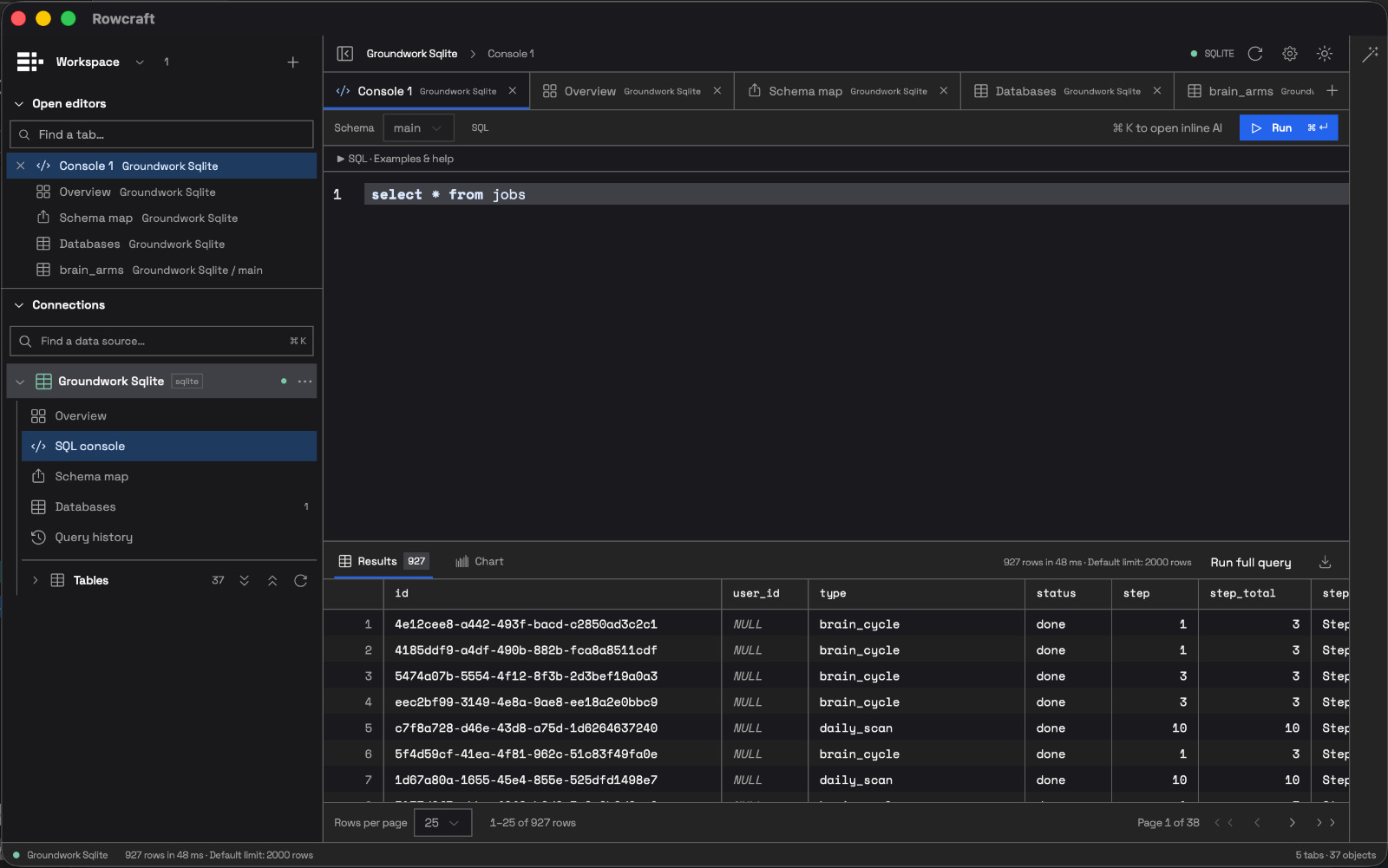
Workspace / Console 1Rowcraft desktop
Rowcraft desktop app showing the database explorer, a SQL console querying the jobs table, and a results grid.
One workspace, from query to results.View full size

Different databases.
The same familiar feeling.

Native connectors & a JDBC bridge.
Bring your databases together.
PostgreSQLMySQL MongoDBSQLite Redis
Database compatibility & driver requirements

Native connectors include PostgreSQL, SQLite, MySQL, MariaDB, Redis, MongoDB, Cassandra, and more. Other databases connect through JDBC, requiring Java 11+ and vendor driver JARs. Support and live testing vary by connector; see the project README for the full status.

Rust at the core.
Resource use at idle.

A measured look at Rowcraft and DataGrip with a database connected and both apps idle.

Tested on MacmacOS 26.6.2 · Apple Silicon

Average observed memory (RSS)

Lower is better
Rowcraft versus DataGrip: average observed memory (RSS) In one connected-idle capture on Mac, average observed resident memory was 35.5 MiB for Rowcraft and 157.5 MiB for DataGrip. The axis runs from zero to 200 MiB. External WebKit helpers are excluded, so this is not total app memory. RowcraftDataGrip 35.5 MiB157.5 MiB 050100150200 MiB
Rowcraft 0.0.1 35.5 MiBDataGrip 2026.2.5 157.5 MiB

Relative CPU usage · DataGrip = 100

Lower is better
Rowcraft versus DataGrip: relative CPU usage Average observed CPU usage indexed to DataGrip at 100: Rowcraft scores 3.9. Raw CPU averages were 0.1833 percent for Rowcraft and 4.6567 percent for DataGrip. This is connected-idle CPU usage, not query speed. External helpers are excluded. RowcraftDataGrip 3.9100 0255075100
Rowcraft 0.0.1 0.18% CPUDataGrip 2026.2.5 4.66% CPUIndex = average CPU ÷ DataGrip average CPU × 100

One 120-second capture after a 30-second warmup. Observed process trees only; external WebKit helpers are excluded, undercounting Rowcraft’s total memory. Memory values are not total app footprints. Relative CPU compares average idle CPU usage, not query or startup speed.

Test conditions & results

Captured October 18, 2026 on macOS 26.6.2 (ARM64, 12 logical CPUs), with 98 samples over 120.04 seconds. Both app instances were sampled on the same Mac. Values show average resident set size (RSS), weighted by sampling interval, in MiB (1 MiB = 1,048,576 bytes).

Memory is the sum of RSS for each main process and observed descendants. Shared pages may be counted more than once; compressed or swapped allocations are not fully represented. No additional helper processes were attributed. Helpers launched outside the process tree, including macOS-managed WebKit helpers, are not included. This is not macOS physical footprint or JVM heap size. Relative CPU divides each app’s average CPU usage by DataGrip’s average and multiplies by 100; these index values are not percentages of system CPU. Raw CPU is calculated from elapsed process CPU time, with 100% representing one logical CPU fully occupied. Results vary with your workload and system.

View benchmark data

Find your flow.
Keep your context.

From the first connection to the final export, Rowcraft brings the tools you reach for into one considered workspace.

Good SQL.
Room to think.

A focused SQL editor with completion, query history, and results right where you need them. Run a selection or the whole statement.

Find your next insight
a_little_clarity.sql SQL
-- Less friction. More discovery.
SELECT
  something_meaningful
FROM your_data
WHERE curiosity = true;
Your next idea, one query away.
customersiduuid · PKnametextemailtext
1n
ordersiduuid · PKcustomer_iduuid · FKtotalnumeric

See the shape
of your data.

Explore tables, columns, and relationships. Move between your sources without losing the thread of what you’re working on.

Explore the structure

One workspace. Many sources.

Keep documents open across databases. Your next connection doesn’t have to interrupt your last thought.

Take your results with you.

Explore results in the grid, then export the data you need for whatever comes next.

The terminal feels at home, too.

The same Rust engine powers a headless CLI. Query, introspect, and script from your shell.

Your tools.
Your say.

Good tools get better when the people who use them can shape them. Rowcraft is open source. Read the code, bring an idea, or help build what comes next.

Explore the source
GitHub starsGitHub forksOpen issuesCI statusLicense: MIT or Apache-2.0

Before you
settle in.

What is Rowcraft?

Rowcraft is an open source desktop database workbench built with Rust, Tauri, and React. It combines a database explorer, SQL console, results grid, and a headless CLI.

How do I connect my own databases?

Install the desktop app to add your database connections. The preview above is a screenshot of Rowcraft; database connections and queries run in the desktop app.

Which operating systems can I build for?

Rowcraft uses Tauri for macOS, Windows, and Linux. Building from source requires Rust, Node 22.12+, pnpm 11, and the Tauri prerequisites for your platform.

How does Rowcraft handle database credentials?

Connection settings reference environment variable names for passwords. Credentials stay in your environment. SSH tunnels are handled by the Rust engine, with explicit host-key verification.

Make room for your
next discovery.

A calmer workspace. A closer connection to your data.

See the workspace
Build Rowcraft from source

To build the desktop app, install Rust, Node 24, pnpm 11, and your platform’s Tauri prerequisites. From your Rowcraft source checkout, run:

pnpm --dir apps/dg-desktop install --frozen-lockfile
pnpm --dir apps/dg-desktop installer

Find setup details and connector compatibility in the project README.